


GA4 (Google Analytics 4) credits ChatGPT with a new visitor only when the click carries one of two signals. One is the utm_source=chatgpt.com tag on links ChatGPT cites, and the other is the referrer, the address the browser passes on. A new visitor whose click carries neither is filed as Direct, so how to track ChatGPT traffic in GA4 rests on those two signals.
That makes GA4's chatgpt.com source line the obvious check, and it undercounted for a week from 8 October 2026, while most links in GPT-6 answers opened with neither signal. Cedric Huesler of Adobe saw attributable ChatGPT visits across thousands of websites fall to about a third of normal within hours.
A reader at a B2B SaaS company wrote under Huesler's post that "organic ChatGPT leads went to zero" and that the post saved them from "reporting a drop that wasn't real" once the tags returned. This guide shows where ChatGPT visits land in GA4, where GA4 stops, and how Atomic tracks what GA4 cannot see: the answers that cite the brand and the pages ChatGPT requests.

Key takeaways
- Count identified ChatGPT sessions across every channel, because GA4's AI Assistant channel includes only sessions with the medium ai-assistant.
- A new visit with neither signal is recorded as Direct, and no channel group can give it back its ChatGPT source.
- Atomic tracks the answers and ChatGPT's page fetches beside the clicks, so a tagging break can be checked against two lines the link tag does not touch.
- A broken week goes to leadership as identified sessions plus a separate estimate, with the attribution model unchanged.
Why does ChatGPT traffic show up as Direct or Unassigned in GA4?
ChatGPT traffic shows up as Unassigned when a click arrives with the tag alone. It shows up as Direct when a new visitor's click loses both signals. Google's page on traffic sources says a session "is processed as direct traffic when no information about the referral source is available."
The tag is an Urchin Tracking Module (UTM) parameter. ChatGPT's tag names chatgpt.com as the source and sets no medium, the traffic type GA4 pairs with a source.
The AI Assistant channel takes only sessions with the medium ai-assistant, and GA4 sets that medium when the referrer is on its list of assistants. So a chatgpt.com session with no medium matches no default channel rule and lands in Unassigned.

Either signal can go missing on the way to the website, and each loss has its own cause. GPT-6 left the tag off most links. A link opened with noreferrer, a browser instruction, keeps the tag but drops the referrer. That is why tag-only visits predate GPT-6, and Clickport's April 2026 snapshot found 935 of 2,619 recognised AI sessions with a tag and no referrer. Redirects can strip the tag, and link shorteners the referrer.
| What the click carries | Session source / medium | Channel |
|---|---|---|
| Tag and recognised referrer | chatgpt.com / ai-assistant | AI Assistant (seen in one property) |
| Recognised referrer, no tag | chatgpt.com / ai-assistant | AI Assistant |
| Tag only | chatgpt.com / (not set) | Unassigned (follows from Google's rules) |
| Referrer from before the May 2026 rollout, or unrecognised | chatgpt.com / referral | Referral |
| Neither, new visitor or past the lookback window | (direct) / (none) | Direct |
| Neither, returning visitor inside the lookback window | The earlier visit's source | The earlier visit's channel |
| Tagged link reused on another page | chatgpt.com | ChatGPT, for a click it never sent |

Why did ChatGPT traffic drop in October 2026?
The October drop started in ChatGPT's links, where both signals are set. Most GPT-6 links opened with neither signal, so those visits arrived without a label. OpenAI's release notes date the release, while Huesler and Profound, which sells AI visibility software, date the break in their own data:
- 7 October 2026: GPT-6 with Intelligent UI reaches paid plans, and the Free and Go plans a day later.
- 8 October 2026: From about 2pm Pacific Time, most GPT-6 links open with noopener,noreferrer and no tag.
- 14 October 2026: OpenAI confirms a known bug to Huesler, by his account.
- 15 October 2026: By 9am Pacific Time, tagged clicks in Adobe's telemetry are back to 95 to 100% of the same hour a week earlier.
- 16 October 2026: By 06:30 Coordinated Universal Time (UTC), about 99% of Profound's collected answers with cited links carry a tagged link again.
Intelligent UI is ChatGPT's new answer layout, and Profound found that the more answers used it, the fewer carried a tagged link. The share of answers with at least one tagged link sat near 75% on 9 October, when about a quarter used the new layout. It collapsed on 14 October, when the layout reached 92%.

Profound adds that the share describes answers, so it gives no "direct multiplier" for traffic reports.
Huesler's click data shows the scale. He compared 9 to 12 October with the same four days a week earlier, and attributed ChatGPT visits fell 61% across all websites, on mobile and desktop alike. Over the same days, the page fetches ChatGPT makes for its users fell 16%, so the visits fell almost four times as far as the fetches.
The break hit every page type and industry Huesler reported. Deep pages lost the most, with product and category pages falling about twice as far as homepage landings. Those deep pages are the ones Huesler advised watching for Direct during the break.
Adobe's tagged-click recovery and Profound's tagged-answer recovery came about 15 hours apart, so each property reads its own break window from its chatgpt.com line. Huesler's recap sums up the week: "the visits weren't lost, they were hidden."

What GA4 can show on its own, and where it stops
GA4 shows the ChatGPT referral traffic it can identify, and four checks make that count easier to read before it goes beside Atomic's answer and crawler data:
- Read every row each assistant lands in. The Traffic acquisition report, by Session source / medium and channel, filtered on each assistant, shows chatgpt.com in AI Assistant, Referral, and Unassigned at once. One analyst's June 2026 audit of a GA4 account found that split.
- Group the assistants in one custom channel. A custom channel group applies to past dates and matches Source on exact assistant domains, because Google's sample regex also catches websites on .ai domains. Google gives each session to the first channel it matches, so this channel sits above AI Assistant, Referral, and Organic Search.
- Set two daily anomaly alerts. Custom insights with the condition Has anomaly watch Sessions for the source chatgpt.com and New users for Direct, with no threshold to set.
- Click a real citation and follow it into GA4. During the break, Profound found tagged and untagged links in the same answer, so a test clicks both the inline citation and a link in its opened panel. It then compares the citation URL, the final landing URL, and the recorded Page location, and checks consent and the session_start event where attribution is missing.
GA4's own AI Assistant channel, added on 13 May 2026, lists its AI platforms only by example. Google's release note named ChatGPT, Gemini, and Claude, while the channel's help page lists ChatGPT, Gemini, DeepSeek, Copilot, and Grok. So Perplexity and Claude rows are the first to check:
| Engine | What its clicks carry | Where GA4 files them |
|---|---|---|
| ChatGPT | The tag; usually no referrer | Unassigned, AI Assistant, and older Referral rows |
| Gemini | Tags with a medium on some links, reported from 1 October 2026; a referrer apps can strip | AI Assistant when the referrer or the tag survives |
| Claude | A claude.ai referrer | AI Assistant when GA4 recognises the referrer; named at launch, missing from the help page |
| Perplexity | A perplexity.ai referrer | Seen landing in Referral |
| Microsoft Copilot | A referrer on some clicks; copilot.com tags on shopping links | AI Assistant with a referrer |
| AI Overviews and AI Mode | Google's own links | Organic Search; Search Console's AI report shows impressions only |
In the worked example used later in this guide, Vendor A, a B2B SaaS company selling accounts payable software, shows the split. Its AI Assistant row for 1 to 7 October holds 1,890 of 3,150 AI sessions, and the other 1,260 sit in Unassigned and Referral.

Even with every check in place, three gaps stay open, because GA4 sees a click only once it reaches the website:
- A new visitor's click with neither signal becomes Direct, and no channel group can pull it back, since the session carries no AI source to match.
- An answer without a click never reaches GA4, so a brand that ChatGPT cites or recommends leaves no row.
- ChatGPT's own page fetches stay out, because GA4 excludes known bot traffic.
How to track ChatGPT traffic with Atomic, step by step
Atomic starts from the same GA4 property and adds two signals GA4 cannot collect, the answers and the page fetches. That gives each gap above a second line to read.
1. Connect GA4, Search Console, and the conversion events
Atomic's quickstart connects the Search Console property, the GA4 property, and the conversion events in one setup. Its Data sources page then shows which property and website are connected. The docs warn that a wrong mapping can look like traffic loss, so the connection is the first thing to check after any drop.
2. Read AI clicks and conversions by engine
With GA4 connected, Atomic's AI Search Overview and Generative engines views group GA4 sessions by AI engine. Each engine gets its clicks, conversions, and average time, the base of AI traffic attribution. ChatGPT, Claude, Perplexity, Gemini, and Copilot sit in one table with their conversions. A first check sets the ChatGPT row against GA4's chatgpt.com total across all channels.
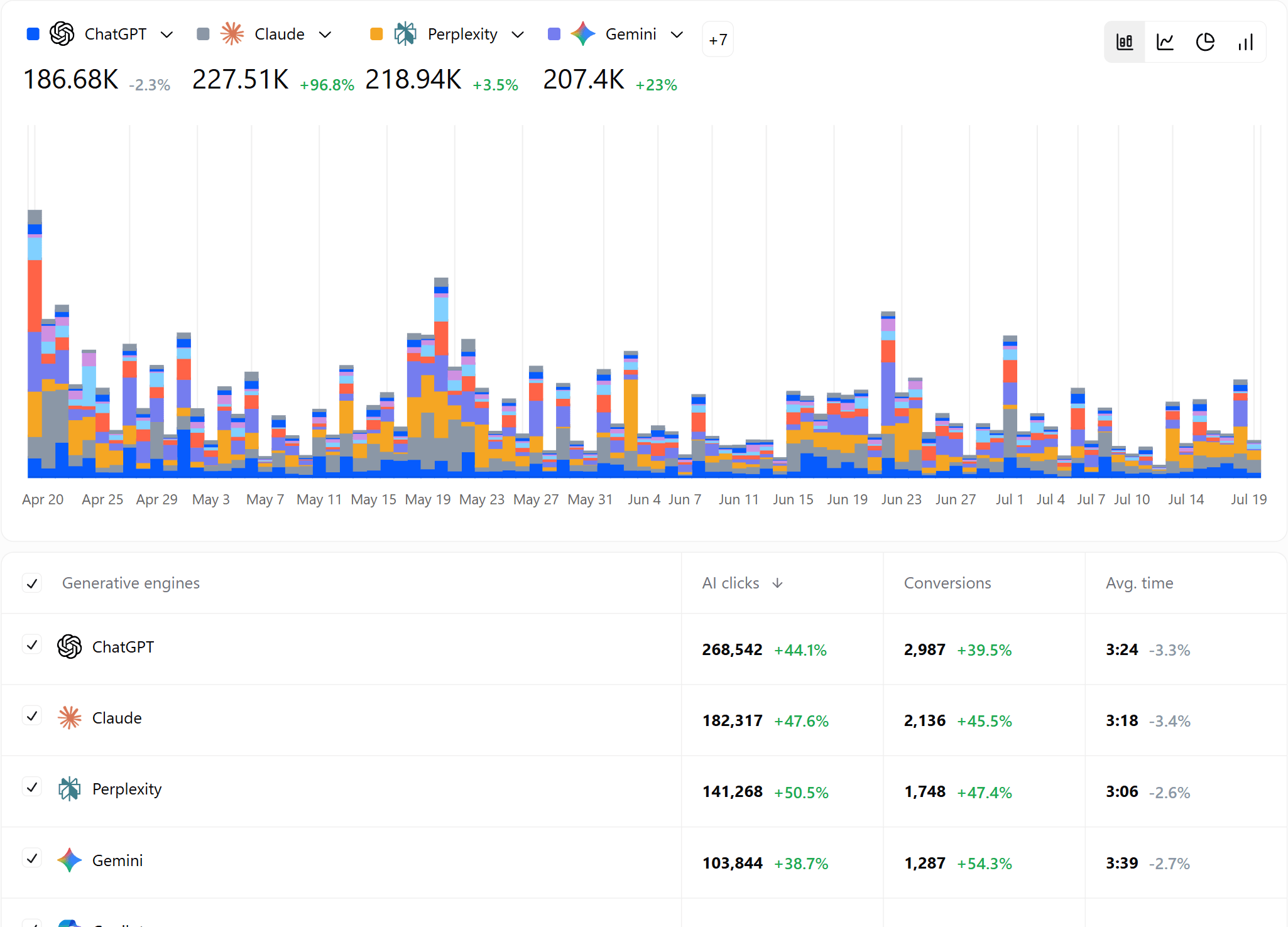
Atomic's docs flag a drop on one engine only as platform-specific, and in October the first thing to check on ChatGPT was its tagging. The clicks are still GA4's, though, and the docs say "a referral missing its source information may not appear as an AI session."
So a visit GA4 filed as Direct stays out of this view as well. Its conversion goes with it, because conversions come from the same sessions. That is why step 3 turns the click data into a watch list for Direct, and steps 4 and 5 read signals outside the click data.
3. Find the pages AI visitors land on
During the break, Huesler advised teams to "watch direct on the deep pages ChatGPT used to send people to," and Atomic's AI Search Pages view lists those pages. It shows every page AI visits landed on in GA4, with clicks and average time for each.
The weeks before a drop pick the pages to watch. New visitors who reach them without either signal are filed as Direct, so their Direct new users, set against comparable pages with little AI traffic before the break, show the unlabelled arrivals.
4. Track the answers that cite the brand
The answers are the first signal outside the clicks. Atomic's prompt tracking runs the questions a team chooses on the engines it selects: up to 3, up to 6, or a custom set, depending on the plan. Atomic collects those results "through AI product interfaces" as well as APIs, to reflect what users are likely to see. That way visibility and citations come from the answers themselves, with no link tag involved.
The AI Visibility view shows visibility, position, and citation share by engine, with each run's saved answer, ranked results, and citations behind it. The Citations view ranks the pages and domains those answers cite.
Suppose Vendor A, the worked example, tracks What is the best accounts payable software for a finance team? with its other questions in ChatGPT. If its ChatGPT clicks fall in a week when its measured visibility and citation share hold across those tracked questions, the next check is attribution.
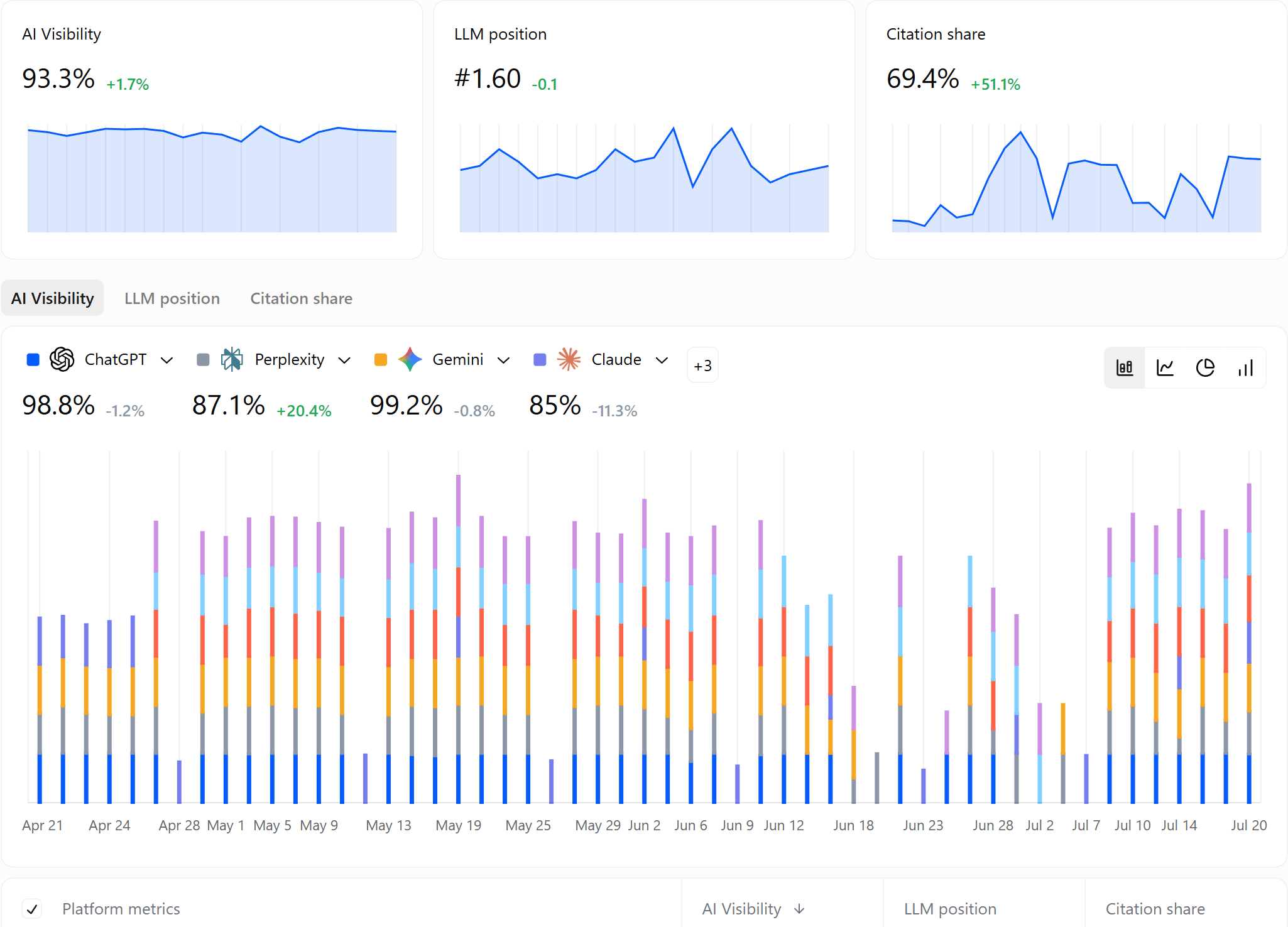
Atomic's metrics guide says answer visibility "can change without a corresponding traffic change," so it is a separate signal from the clicks. Read beside the Generative engines view, the AI Visibility view shows whether the answers held while the clicks fell, for a team's own tracked questions.
5. Count ChatGPT's page fetches in Crawler logs
The second signal outside the clicks is the requests ChatGPT makes itself, which Crawler logs record for recognised AI bots once the website is connected through Cloudflare, Vercel, or WordPress. Each bot carries a purpose: GPTBot for training, OAI-SearchBot for search, and ChatGPT-User for fetches made for a user's question.
OpenAI describes ChatGPT-User as the agent ChatGPT uses when it visits a page for a user's question, never for automatic crawling. That request sits outside the link tag, because the server logs it whatever links the answer later shows.
In Huesler's breakdown above, attributed visits fell much farther than ChatGPT-User fetches. The fetch line counts live requests made for users' questions, so it shows continued page access, while the source and Direct rows show where the recorded visits went.
Huesler set the fetch figure beside OpenAI's note that GPT-6 "makes better decisions about when to look something up," so part of the fetch change may be real.

Over longer periods the two lines part ways. Huesler's own data showed fetches falling 81% from early July to early October, while ChatGPT visits climbed 68% by late September. So the fetch line works as a check in the days around a release, while the trend still comes from the clicks.
Atomic's docs add that a request "does not prove that a page appeared in an answer, trained a model, or produced a human visit," so the fetch line never stands alone. Read beside the clicks and the answers, a fetch line that holds while clicks collapse says ChatGPT still requests the pages for its users' questions.
6. Schedule a weekly check of clicks against answers
GA4's anomaly insights stay the daily alarm. For the weekly read, Automations schedule a recurring conversation with an Atomic agent, started from the Status reports or Incidents & triage template. The agents work across AI search data and GA4's AI referrals and conversions. So one such conversation can set ChatGPT clicks against visibility and citations every week.
Is a drop in ChatGPT traffic real or a tracking gap?
A drop can be a tracking gap, a real loss, or both at once, and four questions in order size the tracking gap while showing what else changed. Atomic's docs state the rule: "A traffic decline alone does not establish lost answer coverage."

| Question | Where to read it | What the result shows |
|---|---|---|
| Which row fell? | GA4 source / medium | A shift from ai-assistant into (not set) is a lost referrer with the tag intact, while a fall in the whole source needs the next checks |
| When did it fall? | Generative engines by day; OpenAI's release notes | One engine within hours of a release points to that platform, where a release can change tagging and clicking at once |
| Where did the visits go? | GA4 Direct new users on the pages Atomic lists, against control pages | Excess Direct new users estimate the unlabelled arrivals, under the control-page assumption |
| What held? | Atomic's AI Visibility, Citations, and Crawler logs | Steady answers and fetches show ChatGPT kept citing and requesting the pages; neither counts the missing clicks |
Huesler's first guess was that GPT-6 shows fewer links, until he compared about 500 pages where ChatGPT drove 5% or more of visits. On those pages, ChatGPT lost about 31,000 visits a day while Direct gained about 26,000.
Search on the same pages fell 7%, "the same as everywhere else," which gave the page check a search baseline beside the rise in Direct.
In GA4, new users are the sharper signal, because a returning visitor's visit with neither signal keeps its earlier source inside the lookback window. Direct also holds bookmarks and typed visits, so only the gap against the control pages counts.
A held answer line does not rule out a real fall in clicks. Limy's data scientist Yahel Oren adds that "some of the drop might be real," because Intelligent UI answers inside the chat. "A user who gets a calculator in the answer may never click out," he writes.
That case shows as clicks falling with no matching Direct rise on the landing pages. The page comparison estimates the unlabelled arrivals, but it cannot count visits that never happened, and both losses can occur together.

What to do: Read the source line, the Direct new users on the AI landing pages, the answer line, and the fetch line together every week. Report a source fall that Direct mirrors as a tracking gap, and any shortfall beyond it as a possible real loss.
How to report a broken ChatGPT week with Atomic
Once the checks point to a tracking break, the report starts with a GA4 annotation across the window. It shows on every GA4 report with a line chart. Huesler advised annotating 8 to 15 October as one event. In the Vendor A worked example, the annotation runs to 16 October, when its own chatgpt.com line recovers:
| Vendor A (worked example), daily average | 1 to 7 October | 9 to 15 October | 16 to 18 October |
|---|---|---|---|
| chatgpt.com / ai-assistant | 250 | 50 | 70 |
| chatgpt.com / (not set) | 150 | 85 | 320 |
| chatgpt.com, all channels | 400 | 135 | 390 |
| Direct sessions, 40 AI landing pages | 140 | 340 | 145 |
| Direct sessions, 40 control pages | 100 | 110 | 101 |
| Direct new users, 40 AI landing pages | 90 | 300 | 95 |
After the fix, Vendor A's source total is back near 390 a day, while the AI Assistant row sits near 70. Most ChatGPT clicks still arrive without a referrer, so a report on that row alone would keep showing a fall.
Two scenario estimates size the gap for 9 to 15 October. The Direct-based one counts excess Direct sessions on the 40 AI landing pages Atomic lists. Had they risen 10% like the control pages, they would sit at 154 a day.
The actual 340 a day leaves 186 extra, or about 1,300 for the week. This estimate assumes no untagged campaign hit those pages, and it misses visits to other pages and returning visits credited to an earlier source.
The steady-traffic one assumes ChatGPT kept its 400 a day and subtracts the 135 identified, which gives about 1,850. It counts any real fall as missing.
The leadership report then carries the numbers on separate lines, never added together:
- Identified ChatGPT sessions: 945 for 9 to 15 October, chatgpt.com in any channel
- Estimated untagged ChatGPT sessions: about 1,300 to 1,850, by the two scenarios
- Demo requests: 14 identified, and about 19 to 27 estimated at the identified sessions' rate
- ChatGPT visibility, citation share, and ChatGPT-User fetches: the week's values from Atomic
- Attribution model and channel budget: unchanged
Atomic's Reports put those lines on one page. A report starts from a template such as Conversion tracking or Page performance and takes text blocks for the annotation and the method. It publishes as a shareable link and exports as a PDF.
Leave the attribution model alone for a broken week. Google says session-scoped dimensions such as source and medium "are unaffected by changes to the attribution model," so a new model cannot recover the week. Huesler gave the same advice, reasoning that "the visits never went away."
Atomic is free to start, with basic AI search analytics on the free plan; prompt tracking starts on Starter and Crawler logs on Team, as its pricing page shows.
Frequently asked questions
Does Google Analytics track AI traffic?
Yes, partly, since Google Analytics tracks AI traffic only through a tag or a referrer. It counts visits, so a page that AI answers cite without a click never appears, the gap that AI citation tracking fills.
Can ChatGPT visits that GA4 filed as Direct be recovered?
No, ChatGPT visits that GA4 filed as Direct cannot be moved back, because a session with neither signal carries no AI source for a channel group to match. Atomic's AI clicks come from the same GA4 sessions, so that visit stays Direct in both. Atomic adds the evidence around the gap: the answers it collects itself and the ChatGPT-User fetches in Crawler logs. Together they show whether ChatGPT kept citing the brand on the tracked questions and requesting its pages.
Do ChatGPT's bot visits show up in GA4?
Mostly not, because GA4 excludes known bot traffic, so ChatGPT's fetches belong in server logs or Atomic's Crawler logs.
Does AI traffic show up in Direct or branded search?
Both, since AI traffic lands in Direct when a new visitor's click carries neither a tag nor a referrer. A person who searches for the brand after reading an answer arrives through branded search, which GA4 files under Organic or Paid Search. Ahrefs' Louise Linehan writes that a permanent share of AI visits lands in Direct, so ChatGPT's share of both stays an estimate.
Methodology
This guide combines Google's and OpenAI's documentation, first-hand and vendor reports on the October 2026 break, and Atomic's product documentation, as set out below.
- Reading dates. Google's Analytics help pages were read on 18 and 19 October 2026, its pageview documentation on 20 October 2026, and OpenAI's release notes and crawler documentation on 18 October 2026.
- The October sources. The sequence comes from Cedric Huesler's LinkedIn posts of 13 and 15 October (Adobe telemetry, about 500 pages, and thousands of domains), Profound's collected answers in 30-minute intervals from 8 to 16 October, and Limy's 7-day averages around 9 October. Two practitioner checks are described by what they measured: an analyst's audit of one GA4 account in June 2026 and a BigQuery check of 66 tagged sessions in one GA4 property.
- Atomic's features. Every Atomic view described here was checked against docs.atomicagi.com and atomicagi.com on 20 October 2026. Prompt tracking, Automations, Reports, and Crawler logs need paid plans, and engine counts depend on the plan.
- Limits. OpenAI's release notes, read on 18 October 2026, do not mention the bug, so its confirmation is Huesler's account. Where GA4 files a click that carries the ChatGPT tag with no referrer, or with one, follows from Google's rules, one property's export, and one audited account, never from a ChatGPT case in Google's help pages. Huesler's figures come from Adobe's telemetry, not GA4, and his page comparison from four days of sampled data. Beyond setting his fetch figure beside OpenAI's note on GPT-6, he does not interpret it, so the reading in step 5 is Atomic's.
- Examples. Vendor A and its figures are a worked example, not a company's data, and its GA4 table recreates GA4's Traffic acquisition report with those values. The tracked question in step 4 belongs to that worked example and carries no figures.
- Publishers' interests. Profound sells AI visibility software, Limy and Clickport sell analytics software, Ahrefs sells SEO software, Adobe sells Adobe Analytics and the brand visibility products Huesler works on, and Atomic, which publishes this guide, sells AI search tracking.
- Images. The screenshots of Google's help page, Huesler's post, and Atomic's documentation were captured on 20 October 2026. The Atomic views are Atomic's own product images, shown on an example project.
Sources
The documentation, studies, and reports behind this guide:
- Google Analytics help: campaigns and traffic sources, default channel group, custom channel groups, (not set) values, direct traffic, user and traffic acquisition reports, traffic-source scopes, Insights, annotations, campaign URLs, known bot-traffic exclusion, release notes, and the developer guide on pageview parameters
- OpenAI: ChatGPT release notes, OpenAI crawlers
- Studies and vendor reports: Profound, Limy, Clickport, Ahrefs
- Trade press and posts: Search Engine Roundtable on the missing tags, on Search Console's AI report; Search Engine Journal on Gemini's tags (1 October 2026); Cedric Huesler's LinkedIn posts of 13 October (fetches and visits, page check, breadth check) and 15 October 2026
- Atomic: AI Search Overview, Generative engines, AI Search Pages, prompts, AI Visibility, Citations, metrics, Crawler logs, Reports, Automations, Data sources, quickstart, AI search tracking
