Atomic AGI connects three parts of search marketing: data from AI answers and website performance, strategy built from entity and competitor coverage, and agents that help execute reviewed work. That makes it a Peec AI alternative for teams responsible for Google SEO as well as AI search.
Connect AI visibility with Google performance and website outcomes
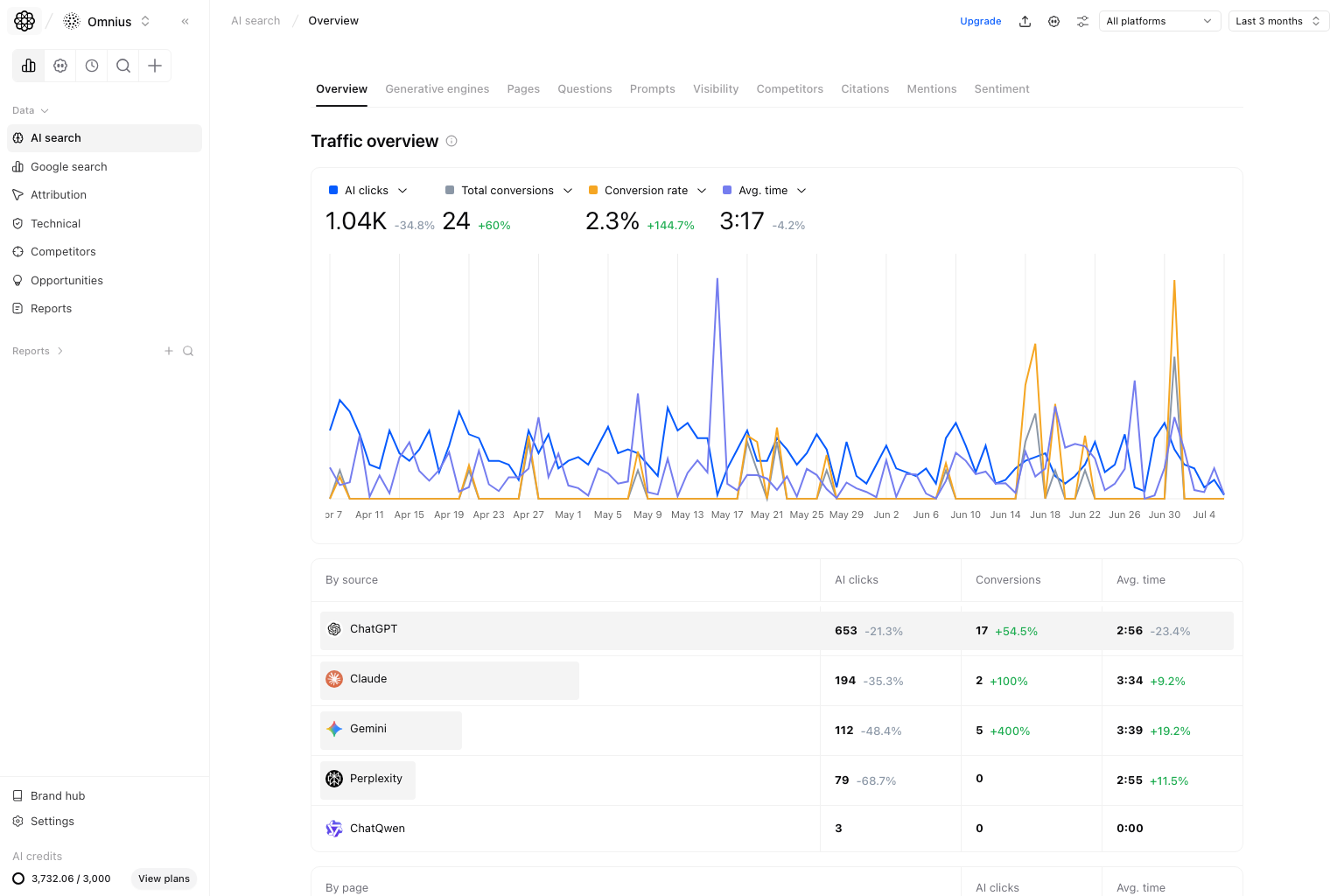
Atomic brings Google Search Console queries, clicks, impressions, CTR, and position together with AI-search observations and GA4 attribution. Peec also provides GA4 AI Referrals; GA4 is not an Atomic-exclusive integration.
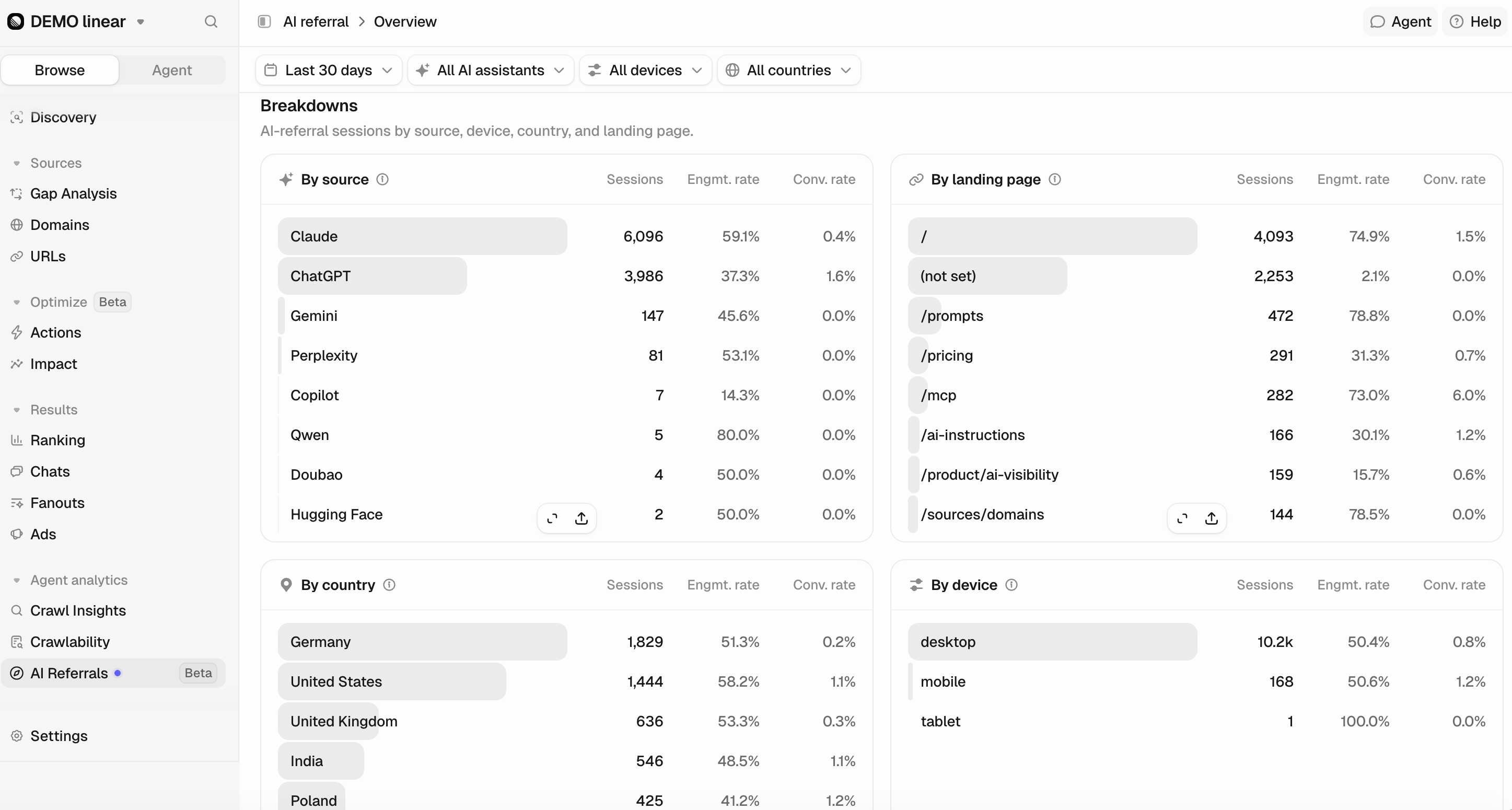
Use these signals to distinguish different problems. Strong Google rankings with weak AI inclusion call for a different investigation from falling organic clicks. More AI mentions without more referred visits do not establish traffic growth. More visits without configured conversions do not establish business impact.
Why Atomic is a better fit for a team responsible for all search traffic: Peec’s AI Referrals explains visits from AI assistants. Atomic lets the same team investigate those visits and configured conversions alongside Google queries, landing-page performance and technical evidence. The advantage is a wider diagnosis of why a page is losing business, rather than treating an AI-referral trend as the whole search picture. Both products support GA4; this is not an exclusive integration.
Map market coverage through entities, clusters, and the funnel
Atomic’s Entities, Clusters, and Funnel views classify website content and compare coverage with competitors. They help distinguish a missing subject from an existing page with weak performance, then connect the finding to planning. These Strategy capabilities start on Team.
For a SaaS company missing from commercial AI recommendations, inspect whether the gap is an uncovered entity, a weak comparison page, missing third-party citations, or a crawl problem. Open the supporting pages and source counts before commissioning content. Incomplete synchronization or missing measurements are not evidence of zero performance.
This is the role of Atomic’s ontology: organizing pages and market subjects into connected evidence for prioritization. Peec’s topics, tags, Actions, and perception studies are useful tools, but they are not an equivalent sitewide entity, cluster, and funnel coverage workspace.
Investigate technical access before rewriting a page
Atomic’s SEO audit connects issue groups to affected URLs. Its LLM audit examines crawler access, robots.txt, sitemaps, schema, headings, readability, entity coverage, and Lighthouse-based diagnostics. Audit scores describe checks, not predicted AI visibility or revenue.
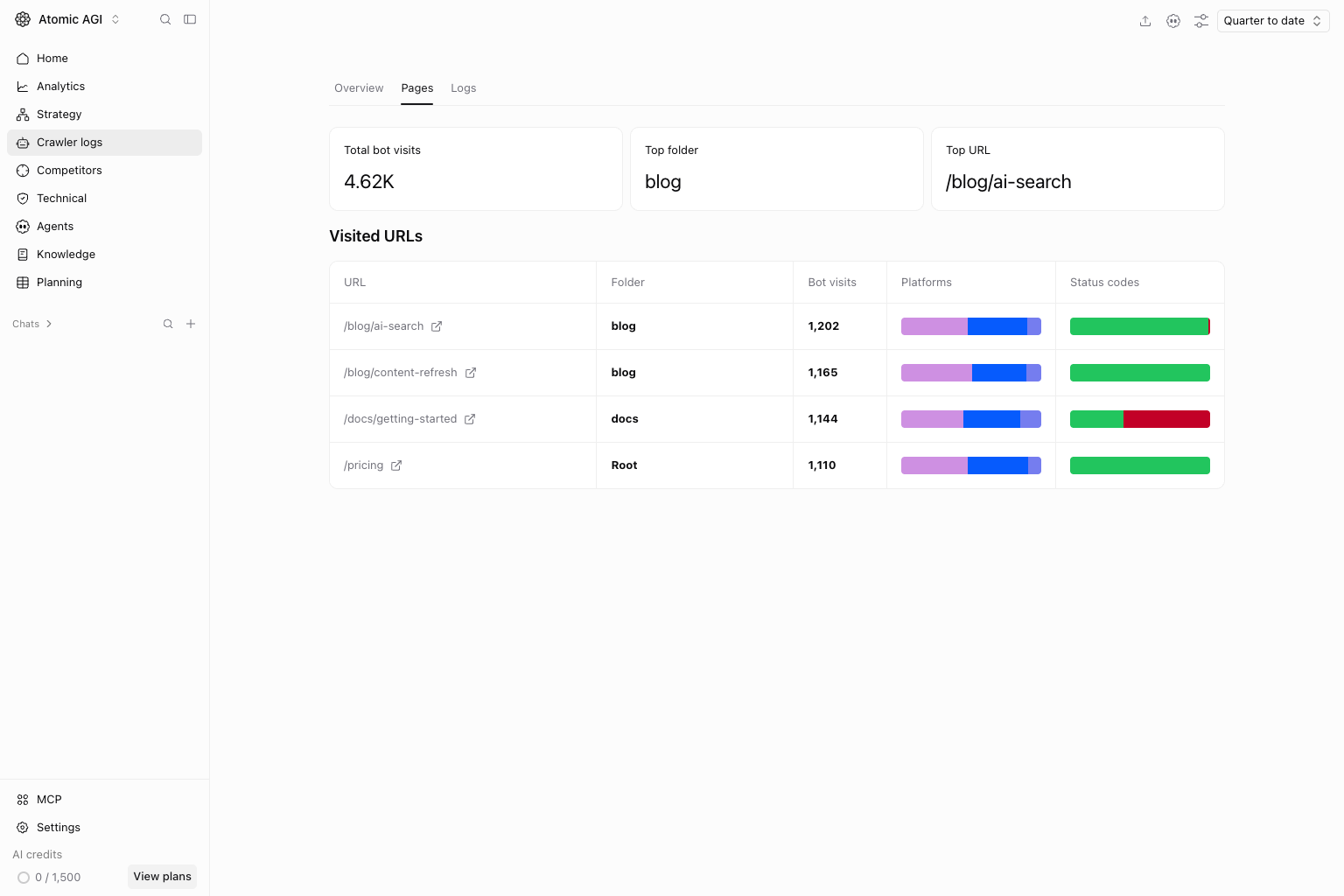
Crawler logs adds observed requests by bot identity, purpose, URL, folder, and HTTP response. Team and higher plans support Cloudflare, Vercel, and WordPress connections. A bot visit proves a request was observed; it does not prove a citation, model training, or a human session.
Peec’s Crawlability checks AI-bot robots.txt access, while Crawl Insights analyzes bot activity and response codes from connected logs. Its Content Optimization workspace also includes available page SEO checks. The distinction is Atomic’s broader site audit and page-investigation scope.
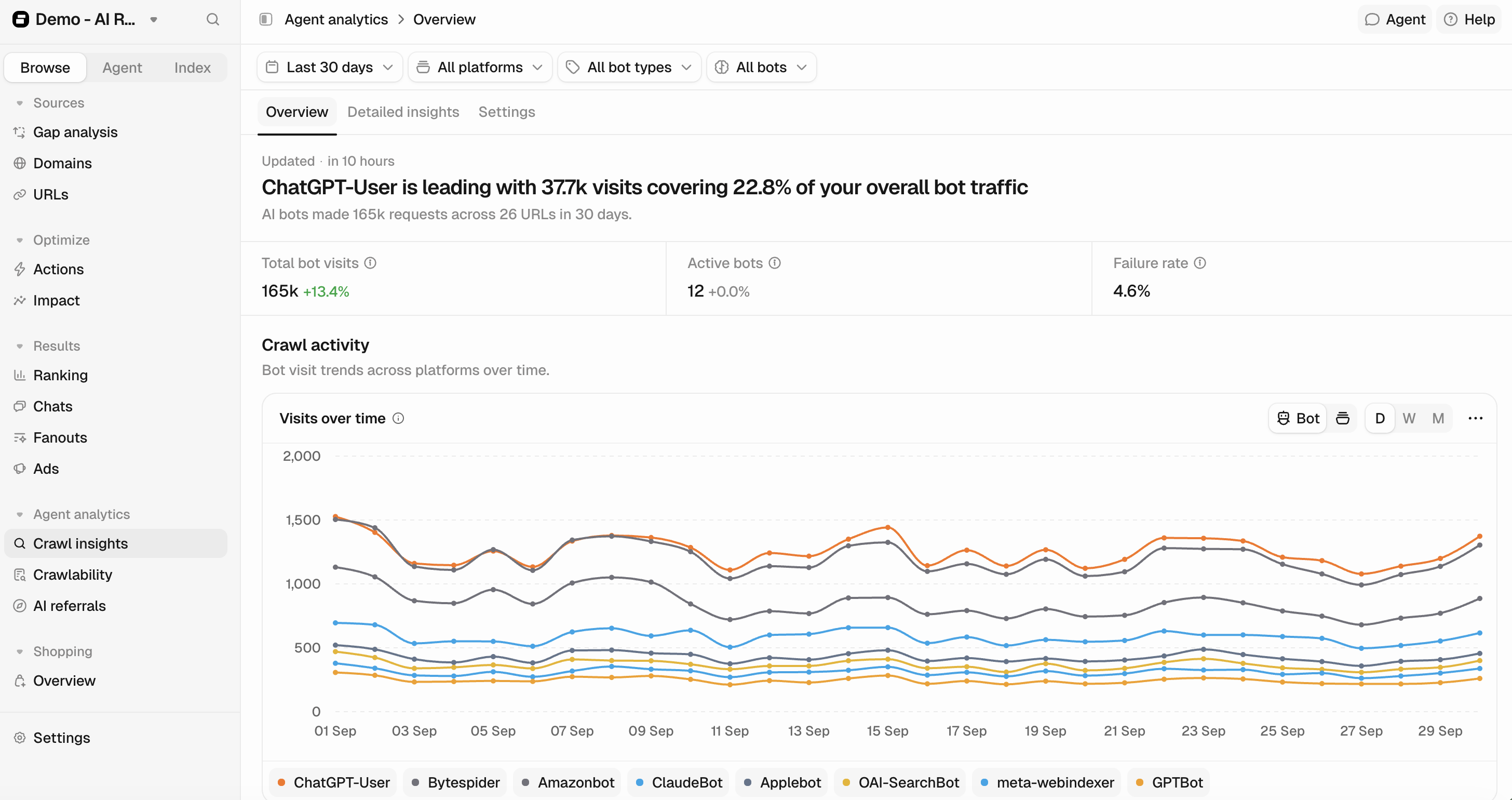
Why Atomic is better for investigating a crawl failure in the wider SEO context: both tools expose observed bot activity. Atomic’s page-level crawler view groups visited URLs with folders, platforms and response-code distributions, while the same workspace provides SEO and LLM audits, internal-link evidence and indexing checks. That lets a team investigate whether a failed request accompanies a template, discovery or page-quality problem. This advantage is the connected investigation, not a claim that Peec cannot report URLs or response codes. Crawler logs require Team or higher and a supported connection.
For related diagnosis, inspect Atomic’s internal-link tables and mindmaps, query-overlap evidence, and indexing checks and requests. Use these to decide whether to improve a page, consolidate overlapping URLs, repair links, or investigate discovery. Requesting indexing does not guarantee inclusion.
Give agents the evidence and tools needed for the task
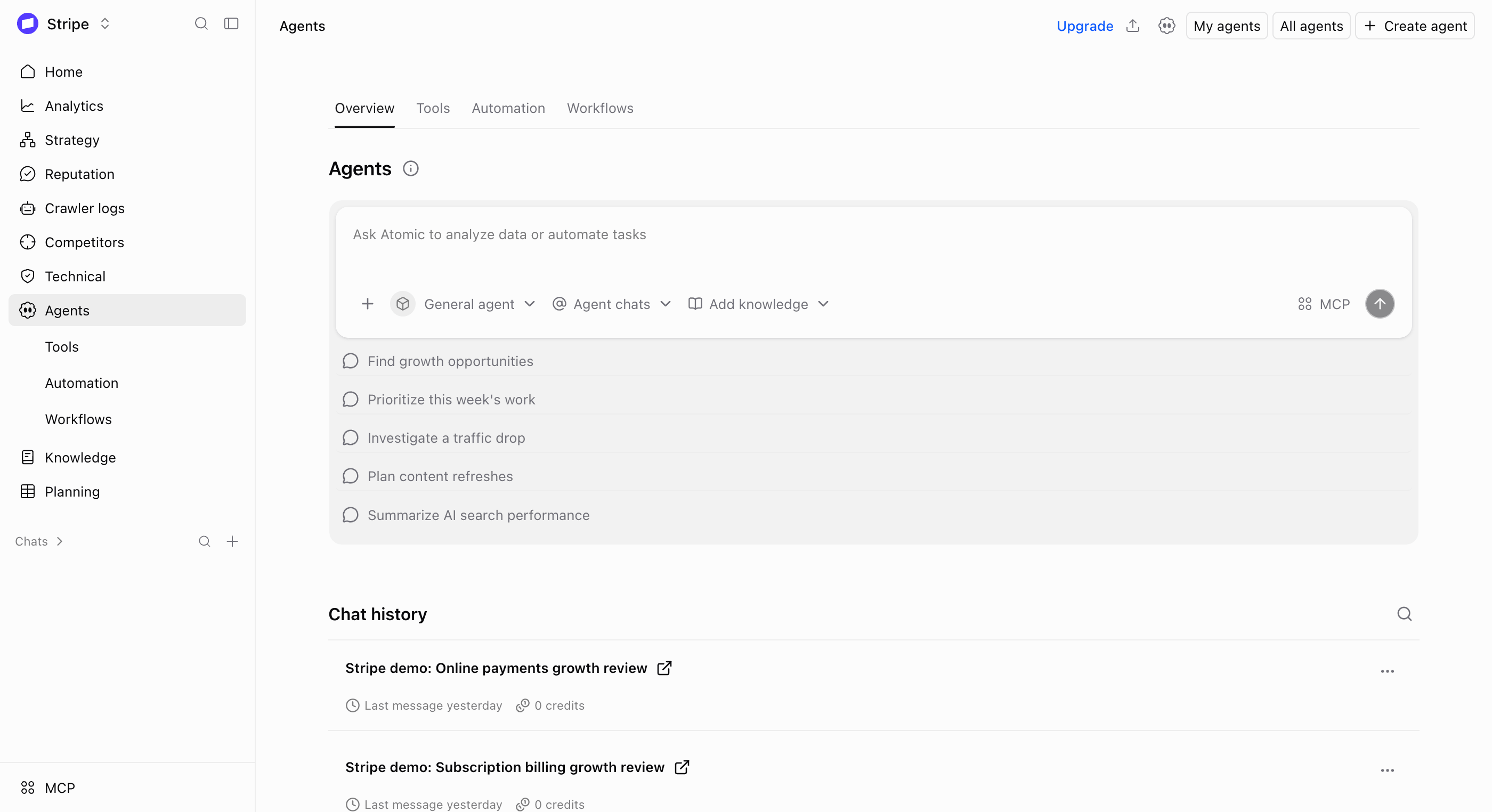
Both platforms have agents. Atomic’s specialist agents can work with connected search analytics, website content, audits, competitors, and company knowledge. Configure the sources and tool permissions around the job, such as diagnosing a page losing Google clicks or preparing a refresh from a verified coverage gap.
Peec Agent analyzes Peec data, generates charts, uses skills and project/company context, and works with authorized connectors including Webflow, Notion, Linear, Lovable, HubSpot, and PostHog. Its MCP supports authorized reads and writes, including content changes. Atomic’s advantage is the broader search and website context available to its agents, rather than the mere presence of an agent.
Turn findings into reviewed work
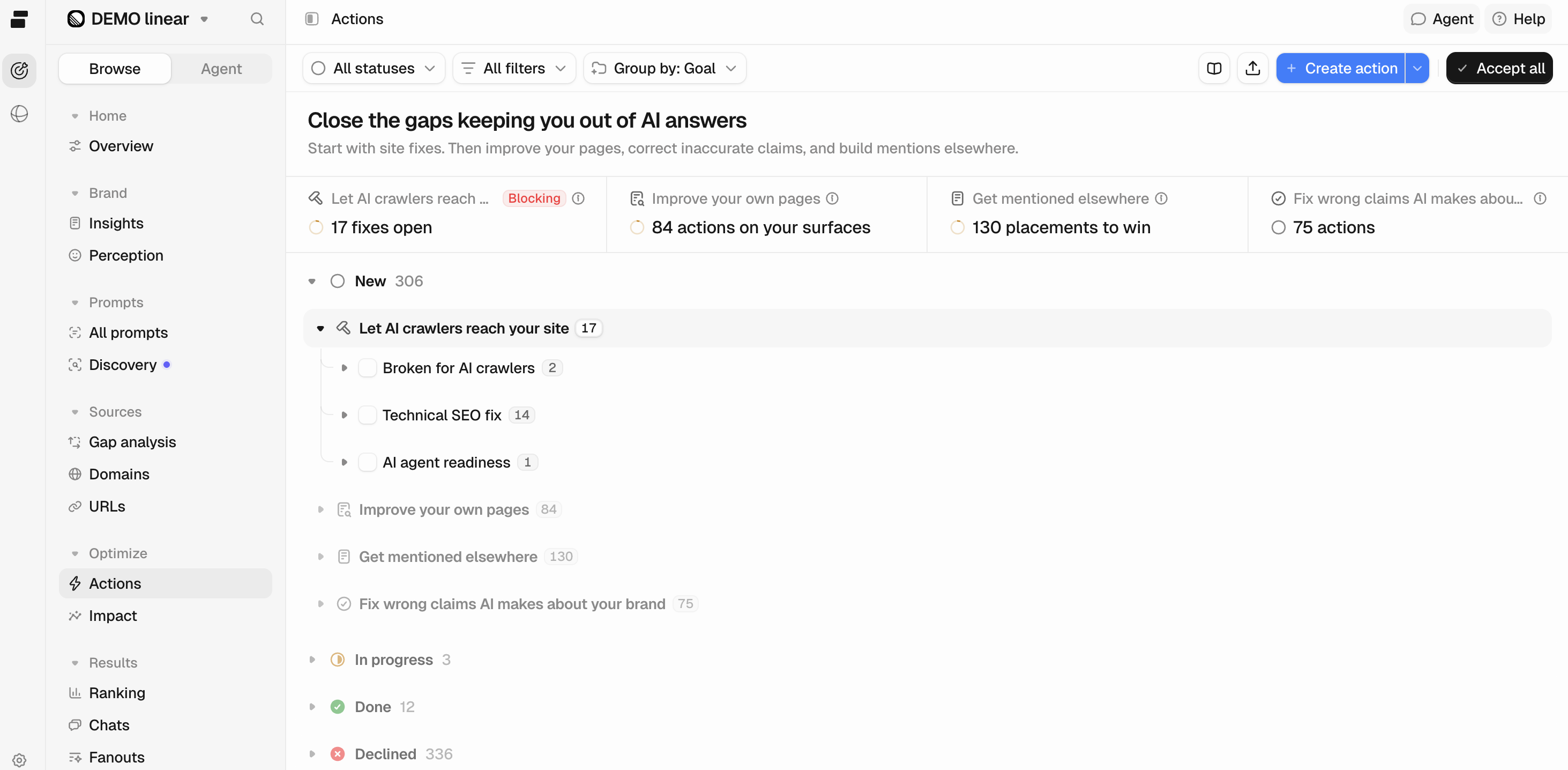
Peec’s Actions workspace groups recommendations around crawler access, page improvements, external mentions and inaccurate brand claims. Review the evidence and status of an action before deciding what to change.
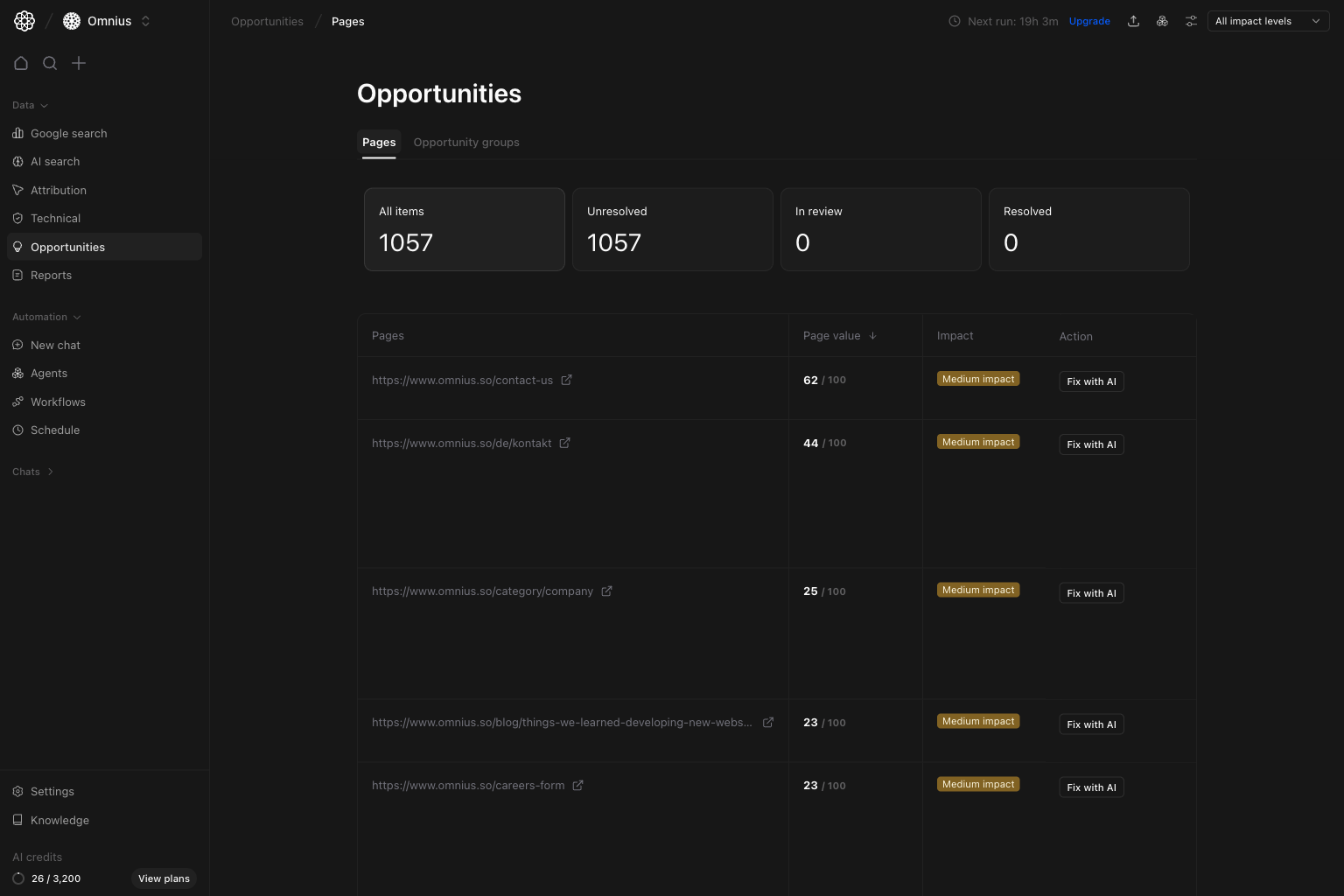
Why Atomic is better for prioritizing website fixes with business context: Peec Actions organizes recommended improvements. Atomic’s matching Opportunities workspace, shown below, groups page-level findings by unresolved, review and resolved status, then helps prioritize URLs by page value and estimated impact. Open the issue details before using Fix with AI to prepare a change. The advantage is the connection to Google performance, technical evidence and reviewed execution in the same project. Page value is a relative prioritization score, not revenue, and estimated impact is not a promised result. Both platforms provide recommendations; compare the evidence behind the action.
On Team and above, Workflows combines inputs, research, branching, review, tool calls, scheduling, and execution history. Grids organizes typed records and workflow operations. Publishing steps require an appropriate connected destination and permission; they are not enabled automatically by finding an opportunity.
A real example: refreshing this Webflow comparison. On 22 October 2026, Atomic’s CMS tools were used to read this page’s existing fields, update selected comparison and article content, publish the item, and independently compare the saved and live values. The verification confirmed publication. It did not measure a ranking or conversion improvement.
- Research: check the existing page and both vendors’ documentation before changing claims.
- Prepare and review: update selected native CMS fields while preserving the page’s template, images, and unrelated fields.
- Publish: send the reviewed changes to the connected Webflow item.
- Validate: compare saved and published values, then inspect the actual live page, images, links, and responsive layout.
This example demonstrates the CMS tool sequence used on this page, not a claim that an automated workflow produced the research or that every workflow has the same destination. A recurring production process can place human-review and publishing steps in the visual builder.
When should you choose Peec AI instead?
Peec is worth considering when your priority is daily AI-answer tracking with unlimited team access. Its brand-perception studies and product-level AI Shopping can also matter for teams investigating how AI describes their brand or recommends individual products.
Compare the work around those observations. Atomic brings Google Search Console performance, entity and topic coverage, technical investigation, and reviewed workflows into the same workspace. Choose based on the data and actions your team needs, then compare prompt limits, refresh frequency, seats, and total cost.
Compare tracking frequency as well as prompt limits
Atomic monthly USD plans, per project: Starter is $40 with 75 prompts, up to 3 models, 4 members, and 72-hour refresh. Team is $100 with 240 prompts, up to 6 models, 10 members, and 48-hour refresh; it adds Strategy, Workflows, Grids, and crawler logs. Team Max is $200 with 420 prompts, up to 6 engines, 20 members, and daily refresh. Check current plan details.
Peec monthly USD brand plans: Starter is $95 with 50 prompts and 1 project; Pro is $245 with 150 prompts and 2 projects; Advanced is $495 with 350 prompts and 5 projects. These plans include 3 selected models, daily tracking, and unlimited users. Advanced adds Looker Studio; Enterprise, annual billing, regional currencies, and agency plans differ. Sources: Peec’s USD list and plan details.
Atomic Starter covers 25 more distinct prompts for $55 less per month, but Peec observes each tracked prompt more frequently. For illustration only, a 30-day month with three selected engines and one check per scheduled prompt-engine run implies about 2,250 checks for Atomic Starter (75 × 3 × 10) and 4,500 for Peec Starter (50 × 3 × 30). These are scheduling estimates, not measured answers or a like-for-like accounting benchmark; sampling and vendor methods can differ.
Evaluate Atomic Team when the work includes execution. Its $100 tier adds the strategy and operational tools that matter to a team managing Google SEO and AI search together. Choose Peec Starter when daily observations and access for many collaborators matter more than that integrated scope. Choose Atomic Team Max when you need Atomic’s broader workflow with daily tracking and its included seat limit fits.
Switch without treating old scores as a new baseline
- Retain your setup and history. Export the prompts, competitors, markets, tags, models, and reports you need from Peec.
- Connect the project. Add GSC and GA4 where available, then configure the appropriate Atomic plan and permissions.
- Rebuild a representative prompt set. Match the important commercial questions, model coverage, and markets.
- Run an overlap. Compare equivalent dates and questions, with the different cadence and scoring methods in view. Historical scores are not automatically interchangeable or imported.
- Complete one reviewed improvement. Record the change and reassess it after enough data accumulates. Separate publication success from search or business results.
Try Atomic with one real search problem
Try Atomic for free or book a demo. For a two-product evaluation, bring a priority page, a representative prompt set, and the outcome your team needs to explain. If you are still building a shortlist, read our guide to the best Peec AI alternatives.
Method: checked vendor documentation, plan information, and the live page on 22 October 2026. Capability claims describe documented support, not a controlled product-performance test. Peec product screenshots come from its official AI referrals, Crawl insights and Actions documentation. Atomic product screenshots are illustrative views; the CMS publication example records the actual tool sequence used for this page.