


Atomic AGI is a Ceyo alternative for agencies comparing integrated search work with multi-client AI visibility operations. Ceyo combines monitoring, audits, traffic analytics and agents, with white-label and partner capabilities. The decision involves client-domain accounting, current agent availability and the website work included in each process.
Model the book of clients, not just one prompt panel
Ceyo’s pricing centers on client domains and agency scale. A root domain and its subdomains form one client-domain unit with its own prompt library and competitive context. Grow and Pro+ increase the number of projects and markets, while partner arrangements support embedding visibility into another product.
Atomic’s published plans are per project. For an agency with several clients, calculate all required subscriptions, members and data limits before drawing a cost conclusion. A one-client test cannot establish which package is cheaper for the whole portfolio, especially when white-label delivery or embedded access is part of the contract.

Why Atomic is better for an agency that also owns the client’s Google SEO: Ceyo’s public preview focuses on prompt visibility, citations and ranking across AI answers. Atomic’s AI search tracking prompt panel is connected to a broader project investigation that includes Google performance, attribution, coverage and technical evidence. That is useful when a client asks which website change should follow a missing AI mention. Ceyo’s multi-project packaging and white-label delivery remain separate advantages to evaluate; the screenshot is an official feature preview, not a live client result.

Investigate the client’s outcome behind the visibility score
Ceyo’s Traffic Analytics and Google Analytics connection mean that conversion context is part of its product story. Atomic adds a project investigation spanning GSC query and landing-page performance, AI-answer evidence and GA4 outcomes. Test the depth of the relevant reports rather than assuming one platform has no analytics.
For a local-service client, separate the questions: is the brand appearing in the right market, are visitors arriving and are those visits producing qualified enquiries? A citation in another region or an increase in bot activity should not be presented as proof that the client gained customers.
Compare audit evidence with the fixes an agent can make
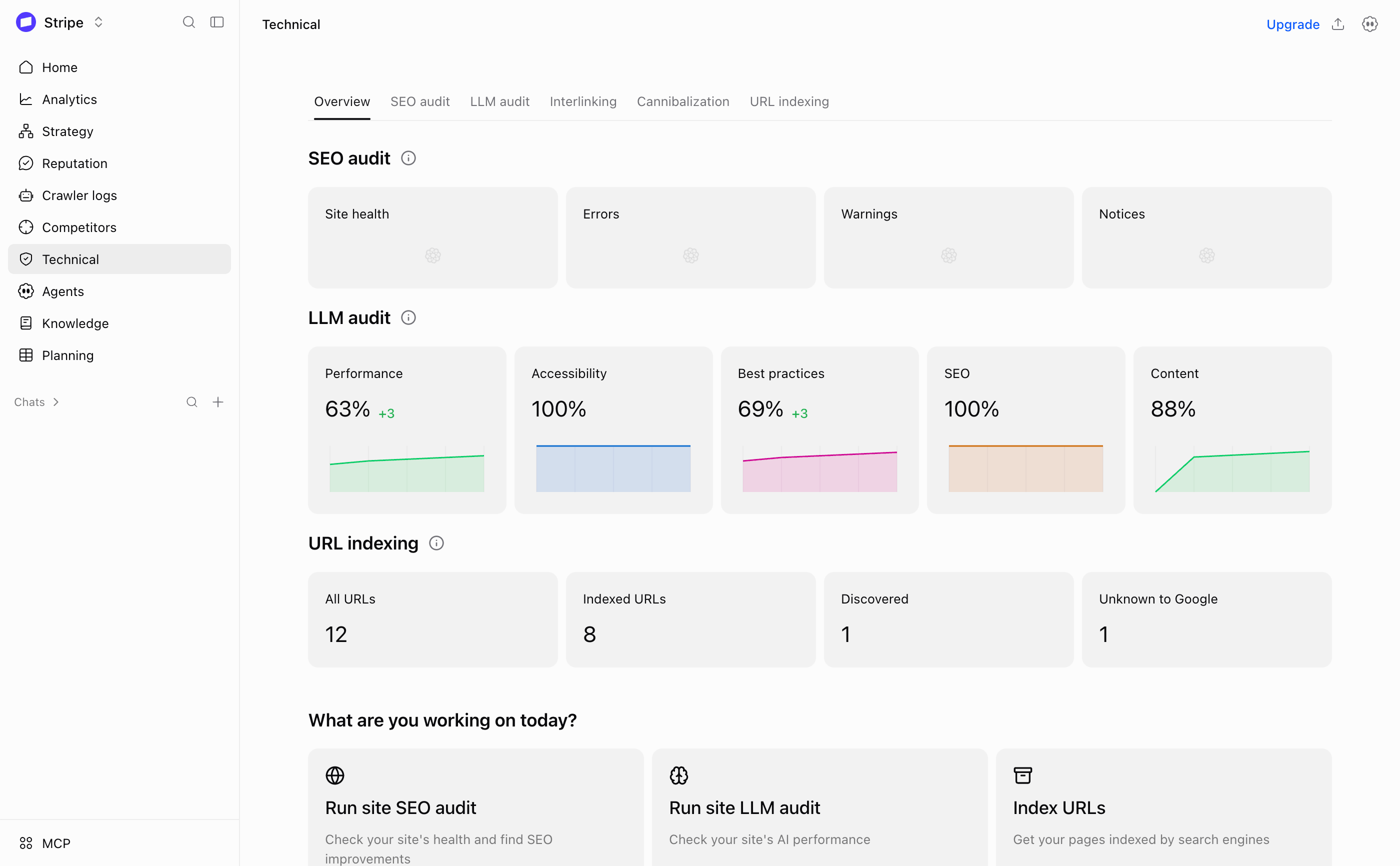
Ceyo documents Site Audit and a Technical Agent covering schema, metadata, sitemaps, robots, hreflang and indexability. Those capabilities deserve explicit recognition. Atomic’s technical workspace combines sitewide issue groups with affected URLs, internal-link evidence, cannibalization and indexing investigation.
Use a client with a known template issue during evaluation. Ask both products to identify the affected pages and prepare a limited repair. Inspect the proposed change before approval and check the final page afterward. An agent’s ability to apply a fix is useful only when the diagnosis and scope are also correct.

Why Atomic is better for reviewing the evidence before approving a fix: Ceyo’s Site Audit preview summarizes AI-readiness signals and recommended fixes. Atomic’s technical investigation technical workspace is a better fit for a reviewer who needs to separate SEO audit findings, LLM-readiness checks and indexing status before deciding on a change. Its related internal-link and cannibalization evidence broadens that decision. This does not mean Ceyo cannot audit or propose fixes; test the actual affected URLs, permissions and rollback process in each product.
Confirm beta access and the current CMS connector
Ceyo’s agent page says WordPress is the live publishing connector and that more connectors are forthcoming. The pricing matrix and FAQ also describe agent inclusion differently, particularly for the Content Agent beta. Obtain confirmation for the exact plan and account before making it part of a client commitment.
Atomic supports authorized WordPress and Webflow CMS operations, with recurring Workflows and Grids on Team. Test the real destination, including drafts, existing-page updates, field mapping and approval. A general promise of publishing should not be treated as proof that a specific CMS or beta feature is available today.
Add a site-coverage plan to the agency action queue
Atomic’s entity, cluster and funnel views help an agency explain why a new page is needed across a client’s buying journey. Competitor URLs and existing content can reveal a missing location comparison, thin service page or overlapping guide. That evidence can become a bounded brief or consolidation task.
Ceyo’s ranked actions identify content and authority opportunities from AI visibility and audits. Compare the reasoning behind one recommendation, not just the number of suggested tasks. The client should be able to understand which gap the work addresses and which page or external source is expected to change.
When Ceyo may be the better fit
Ceyo merits evaluation when multi-client monitoring, white-label exports or an embedded visibility offering are central to the agency’s business. Its live WordPress connector and reviewed technical-agent work may also fit a WordPress-heavy client portfolio.
Atomic is relevant when the agency wants deeper site-coverage and technical investigation connected to recurring project operations. Compare the whole delivery process: source evidence, approval, CMS execution, client reporting and the cost of all domains. Keep beta and future connectors out of promised deliverables until access is confirmed.
Compare the complete plan and operating cost
Ceyo’s displayed annual-billing equivalents are Core $39, Grow $119 and Pro+ $399 per month. They list one, five and unlimited projects respectively, with daily prompt and workflow-credit limits. Agent availability needs confirmation because the public matrix and FAQ differ; white-label exports and API access start on Grow in the matrix.
Atomic monthly USD plans, per project: Starter is $40 with 75 prompts, up to three models, four members and a 72-hour refresh. Team is $100 with 240 prompts, up to six models, ten members and a 48-hour refresh, adding Strategy, Workflows, Grids and crawler logs. Team Max is $200 with 420 prompts, up to six engines, twenty members and daily refresh. A Free plan is available. See current Atomic plan details.
Estimate the actual monitoring and production workload, including every domain, user, model, region, report and recurring action. A prompt definition, collected answer and content operation are different usage units. Compare the complete setup rather than assuming the cheapest entry plan covers the whole job.
Switch from Ceyo with a clear baseline
- Retain the setup: save the prompts, markets, competitors and reports available to your Ceyo account.
- Connect the project: add GSC, GA4 and relevant company knowledge to Atomic, with permissions appropriate to the work.
- Match the questions: rebuild a representative panel across the important engines and markets.
- Run an overlap: compare equivalent dates and source answers, accounting for different cadence and scoring. History is not automatically imported or interchangeable.
- Complete one reviewed improvement: inspect the saved CMS fields and live page, then measure search and business results separately.
Try Atomic with one real page problem
Try Atomic or book a demo. Bring a priority page, a commercial question and the outcome you need to explain. Use the product documentation to follow the investigation from evidence through reviewed work.
Reviewed 23 October 2026 using official product documentation and plan information. A × labeled “not documented” identifies the absence of an equivalent capability in the reviewed materials; it does not prove a custom integration is impossible. ✓ labels retain plan, beta and service qualifications. Product screenshots illustrate both interfaces; example values are not comparative performance results. This is a documented capability comparison, not a measured performance benchmark.